
Igor Aleksandrov
Saturday, May 3, 2025 | 10 minutes
Kustomize - power of customization
What Kustomize is?
Kustomize is a configuration management tool built into kubectl for customizing Kubernetes YAML manifests without modifying the original files. It allows users to define a common set of base resources and then layer environment-specific customizations (called overlays) on top. This makes it ideal for managing multiple deployment environments like development, staging, and production. Instead of using templates or variables, Kustomize works by applying transformations directly to Kubernetes-native YAML.
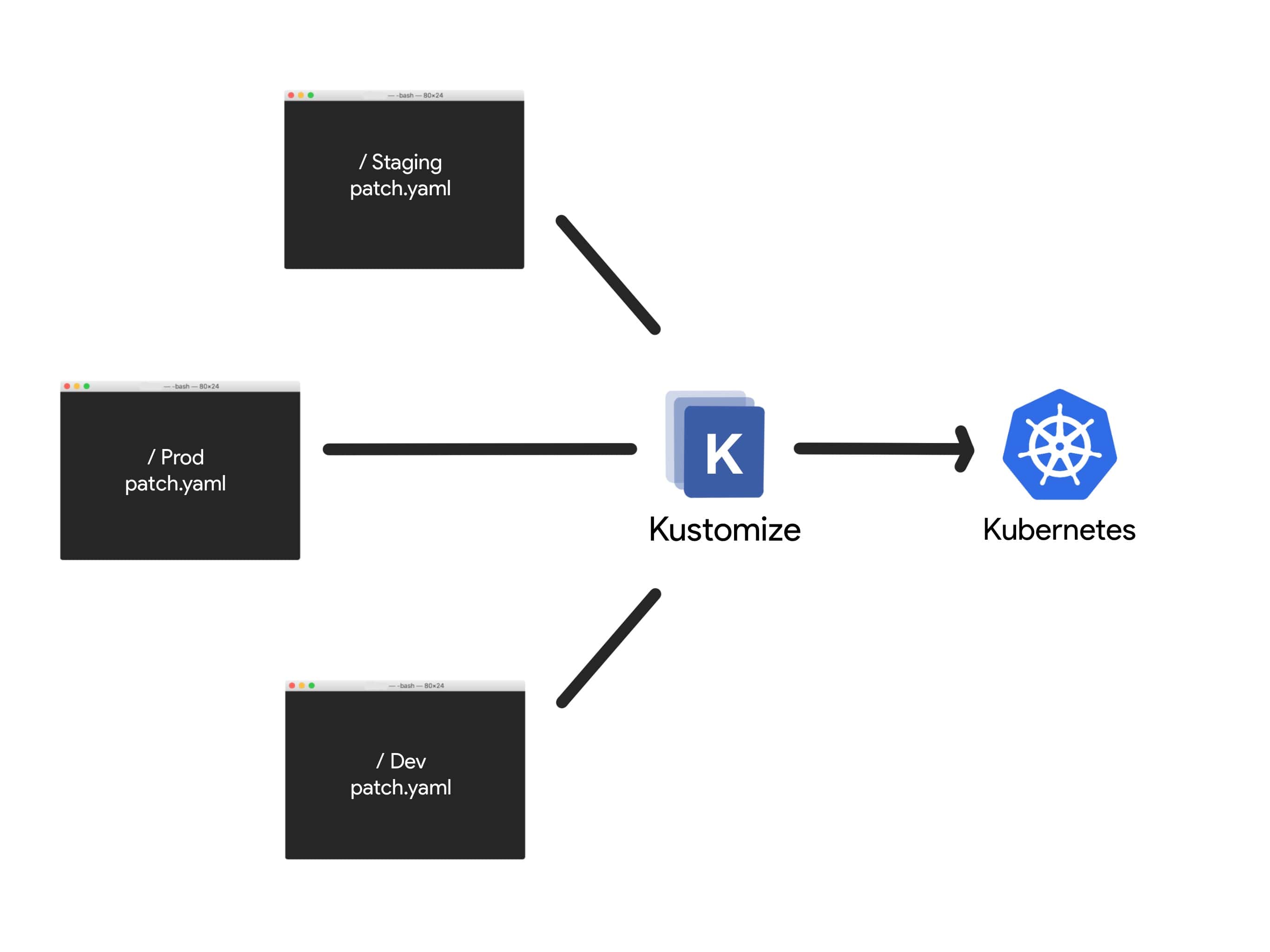
Use cases include adjusting image tags, changing replica counts, injecting configMaps/secrets, and altering resource names or namespaces for different environments. Kustomize helps enforce GitOps best practices by keeping YAML declarative and DRY (Don’t Repeat Yourself). It supports modular design, allowing teams to reuse and compose manifests efficiently. Since it integrates directly with kubectl, it can be used without installing additional tools. Overall, Kustomize is suited for teams looking to manage Kubernetes configurations cleanly and scalably.
How it works
Under the hood, Kustomize is a Go-based tool that processes Kubernetes manifests by reading a kustomization.yaml file, which defines how to assemble and modify a set of YAML resources. The configuration is split into bases and overlays. A base contains raw, reusable Kubernetes manifests, while an overlay applies environment-specific customizations (like replica counts, labels, or image tags) on top of a base. Kustomize loads these resources into memory, then applies a series of transformers to make the requested changes.
These transformers can add name prefixes, inject namespaces, change container images, or modify labels and annotations. Patches can also be applied using either strategic merge or JSON 6902, depending on the level of precision required. Kustomize also supports generators to create ConfigMaps and Secrets dynamically. Once all transformations are complete, the final set of YAML manifests is output for use with kubectl or CI/CD pipelines. This architecture ensures a clean separation between common configuration and environment-specific changes, making deployments safer and more maintainable.
kubectl apply -k
kubectl apply -k is the built-in way to use Kustomize directly with Kubernetes. It tells kubectl to apply a customized set of resources defined in a directory containing a kustomization.yaml file.
To deploy the dev overlay to your cluster, you would run:
kubectl apply -k overlays/dev/
This command:
Reads the kustomization.yaml in overlays/dev.
Loads the base resources it references.
Applies patches and transformations.
Deploys the final YAML to the Kubernetes cluster.
Standalone Kustomize CLI
It also exists as a standalone CLI tool that provides more advanced features and versions independent of Kubernetes. This is useful if you want to use Kustomize in CI/CD pipelines, scripting environments, or need functionality not yet available in your version of kubectl.
You can install the standalone CLI by downloading it from the official Kustomize GitHub releases:
KUSTOMIZE_VERSION='vX.Y.Z' # Releases here https://github.com/kubernetes-sigs/kustomize/releases
curl -LO https://github.com/kubernetes-sigs/kustomize/releases/download/kustomize/$KUSTOMIZE_VERSION/kustomize_$KUSTOMIZE_VERSION_linux_amd64.tar.gz
tar -zxvf kustomize_$KUSTOMIZE_VERSION_linux_amd64.tar.gz
sudo mv kustomize /usr/local/bin/
Or
snap install kustomize
For macOS users, it’s also available via Homebrew:
brew install kustomize
Once installed, you can run:
kustomize build ./overlays/dev
For full documentation and usage examples, visit the official Kustomize docs.
Declarative approach
Kustomize follows a declarative configuration model, meaning you describe what the desired state of your Kubernetes resources should be, rather than how to construct them procedurally. This is done through a kustomization.yaml file, which serves as the entry point for defining how to compose and transform your manifests.
resources:
  - deployment.yaml
  - service.yaml

namePrefix: dev-
namespace: dev

images:
  - name: my-app
    newTag: v2.0.1

configMapGenerator:
  - name: app-config
    literals:
      - ENV=development
      - LOG_LEVEL=debug
This file:
Applies a
dev-prefix to resource namesSets the namespace to
devUpdates the image tag for
my-appGenerates a ConfigMap from literal values.
More about Kustomization File Reference
This declarative approach makes it easy to version-control your configuration, reuse components across environments, and integrate with GitOps workflows.
Demonstartion
Legend:
Skipped aspects: we avoid all kinds of automatization and external access to main services
You are a DevOps engineer at Papa Corp. who is responsible for a one-page corporate site.
The site is hosted in the local Kubernetes cluster and has two environments: staging (pre-production) and production. Each environmet belongs to a separate namespace.
After commit, a new version of the site should be applied to the staging environment firstly. And, if it is all right, it will be implemented on the production.
Your site is static and really simple, it is based on nginx (nginx:alpine). The resources are accessed over cluster’s NodePorts (30088/TCP for staging, 30080/TCP for production).
Workload on the staging is minimal, so you can allocate just 64 MB RAM and 0.1 CPU. For production environment you allocate 128 MB RAM and 0.25 CPU on three replicas (this parameter can be changed manually).
You select a declarative approach, so decide to use Kustomization for deploy both stages of the site.
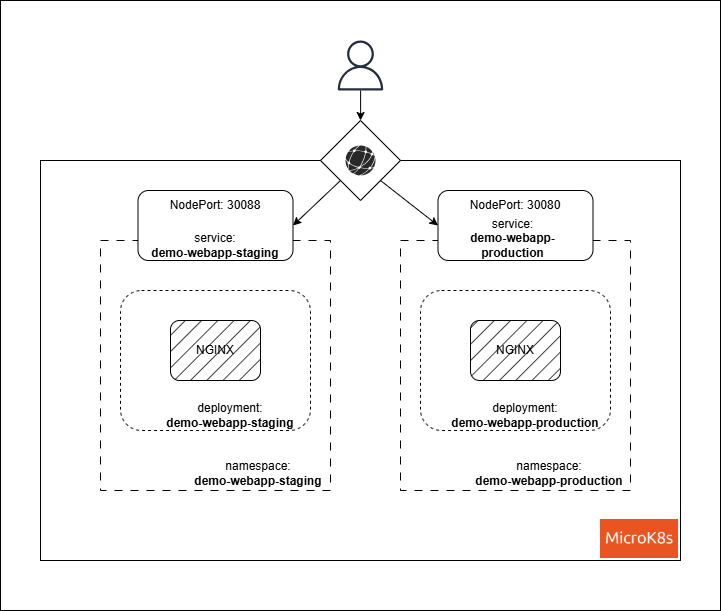
Files Content
Structure of the project is as follows:
Base resources are stored in the base directory, while environment-specific customizations are in the overlays directory. The base directory contains the following files:
deployment.yaml: Defines the deployment for the nginx server.
apiVersion: apps/v1
kind: Deployment
metadata:
  name: demo-webapp # Will be suffixed by the nameSuffix from the overlay/<stage>/kustomization.yaml
  # namespace: demo-webapp-staging # Will be replaced by the namespace from the overlay/<stage>/kustomization.yaml
  labels:
    app: webapp # Will be replaced by the label from the base/kustomization.yaml and the overlays/<stage>/kustomization.yaml
spec:
  replicas: 1 # Will be replaced by the label the overlays/<stage>/kustomization.yaml
  selector:
    matchLabels:
      app: webapp # Will be replaced by the label from the base/kustomization.yaml and the overlays/<stage>/kustomization.yaml
  template:
    metadata:
      labels:
        app: webapp # Will be replaced by the label from the base/kustomization.yaml and the overlays/<stage>/kustomization.yaml
    spec:
      containers:
      - name: nginx
        image: nginx:alpine
        resources:
          requests:
            memory: "128Mi" # Will be replaced by the label the overlays/<stage>/deployment-patch.yaml
            cpu: "250m" # Will be replaced by the label the overlays/<stage>/deployment-patch.yaml
          limits:
            memory: "128Mi" # Will be replaced by the label the overlays/<stage>/deployment-patch.yaml
            cpu: "250m" # Will be replaced by the label the overlays/<stage>/deployment-patch.yaml
        ports:
        - containerPort: 80
        volumeMounts:
            - name: web-content
              mountPath: /usr/share/nginx/html
      volumes:
        - name: web-content
          configMap:
            name: web-content
service.yaml: Defines the service for the nginx server.
apiVersion: v1
kind: Service
metadata:
  name: demo-webapp # Will be suffixed by the nameSuffix from the overlay/<stage>/kustomization.yaml
#  namespace: demo-webapp-staging # Will be replaced by the namespace from the overlay/<stage>/kustomization.yaml
  labels:
    app: webapp # Will be replaced by the label from the overlay/<stage>/kustomization.yaml
spec:
  selector:
    app: webapp # Will be replaced by the label from the overlay/<stage>/kustomization.yaml
  type: NodePort
  ports:
  - port: 80
    targetPort: 80
#   nodePort: 30088 # Will be replaced by the label from the overlay/<stage>/kustomization.yaml
namespace.yaml: Defines the namepsace for the nginx server.
apiVersion: v1
kind: Namespace
metadata:
  name: demo-webapp # Will be replaced by the namespace from the overlay/<stage>/kustomization.yaml
kustomization.yaml: Specifies the resources and configurations for the base.
apiVersion: kustomize.config.k8s.io/v1beta1
kind: Kustomization
resources:
- deployment.yaml
- service.yaml
- namespace.yaml

configMapGenerator:
  - name: web-content
    files:
      - files/index.html

labels:
  - includeSelectors: true
    includeTemplates: true
    pairs:
      app: demo-webapp
The overlays directory contains two subdirectories: staging and production, each with its own kustomization.yaml file and patches for the base resources.
staging/deployment-patch.yaml**: Patches the deployment for the staging environment.
apiVersion: apps/v1
kind: Deployment
metadata:
  name: demo-webapp
spec:
  template:
    spec:
      containers:
      - name: nginx
        resources:
          requests:
            memory: "64Mi"
            cpu: "125m"
          limits:
            memory: "64Mi"
            cpu: "125m"
staging/kustomization.yaml**: Specifies the resources and configurations for the staging environment.
apiVersion: kustomize.config.k8s.io/v1beta1
kind: Kustomization
resources:
- ../../base

patches:
  - target:
      kind: Deployment
      name: demo-webapp
    path: deployment-patch.yaml
  - target:
      kind: Service
      name: demo-webapp
    patch: |-
      - op: replace
        path: /spec/ports/0/nodePort
        value: 30088

nameSuffix: -staging

namespace: demo-webapp-staging

labels:
  - includeSelectors: true
    includeTemplates: true
    pairs:
      app: demo-webapp-staging
      environment: staging
production/deployment-patch.yaml**: Patches the deployment for the production environment.
apiVersion: apps/v1
kind: Deployment
metadata:
  name: demo-webapp
spec:
  template:
    spec:
      containers:
      - name: nginx
        resources:
          requests:
            memory: "128Mi"
            cpu: "250m"
          limits:
            memory: "128Mi"
            cpu: "250m"
production/kustomization.yaml**: Specifies the resources and configurations for the production environment.
apiVersion: kustomize.config.k8s.io/v1beta1
kind: Kustomization
resources:
- ../../base

patches:
  - target:
      kind: Deployment
      name: demo-webapp
    path: deployment-patch.yaml
  - target:
      kind: Service
      name: demo-webapp
    patch: |-
      - op: replace
        path: /spec/ports/0/nodePort
        value: 30080

nameSuffix: -prod

namespace: demo-webapp-prod

labels:
  - includeSelectors: true
    includeTemplates: true
    pairs:
      app: demo-webapp-staging
      environment: staging

replicas:
  - name: demo-webapp
    count: 2
base/files/index.html**: The content of the web page served by nginx.
<!DOCTYPE html>
<html lang="en">
<head>
<meta charset="UTF-8">
<meta name="viewport" content="width=device-width, initial-scale=1.0">
<title>Papa Corp.</title>
</head>
<body>
<header>
<h1>Welcome to the Papa Corp. site</h1>
</header>
<main>
<section>
<h2>About</h2>
<p>This is a simple describe of our company.</p>
</section>
<section>
<h2>Features</h2>
<ul>
<li>Responsive design</li>
<li>Custom styles</li>
<li>Easy to customize</li>
</ul>
</section>
</main>
<footer>
<p>© 2025 Papa Corp.</p>
</footer>
</html>
Demo actions
Prerequest: The demonstation will be provided on Ubuntu OS, you can select any distribution. However, you must have installed microk8s.
Install
KustomizeCLIOnce installed
kustomizego to a project root folder and do
kustomize build base/
As result you can see the final base configured struct of wished infrastructure. None resources will be created, bacause this command acts like dry-run, and a mere creates a mergeged and configured raw YAML-formated scheme for further implemenation.
Do also:
kustomize build overlays/staging
kustomize build overlays/production
Compare the results.
- Now, according to the legend, we need deploy origin resources. Execute subsequent commands:
kubectl apply -k overlays/staging # It will deploy the customized resources on stage (aka pre-production) layer
kubectl apply -k overlays/production # It will deploy the customized resources on production environment
Wait a bit while your Kubernetes creates all resources. After that, check them:
kubectl get all -n demo-webapp-staging # You should see all deployed resources on beta stage
# Get content of a web page
curl localhost:30088

# Check production environment
kubectl get all -n demo-webapp-production # You should see all deployed resources on prod stage
# Get content of a web page
curl localhost:30080
Using kubectl describe <RESOURCE> -n <NAMESPACE>, inspect created resources and compare them with declarated in the yaml files.
- Let’s modify
basic/files/index.html, edit it in some way, for example, by addingversion 2in the header section. After saving, deploy changes on your environments.
Firstly, we implement a new version on the staging:
kubectl apply -k overlays/staging
# Wait a bit and get content of a web page
curl localhost:30088
You should see changed content, compare it with the production one as told above.
The legend says, if the changes are applicable, you will deploy them on production.Do:
kubectl apply -k overlays/production
# Wait a bit and get content of a web page
curl localhost:30080
It is done! Feel free to modify any files and experiment. Good luck!