
Igor Aleksandrov
Thursday, May 2, 2024 | 6 minutes
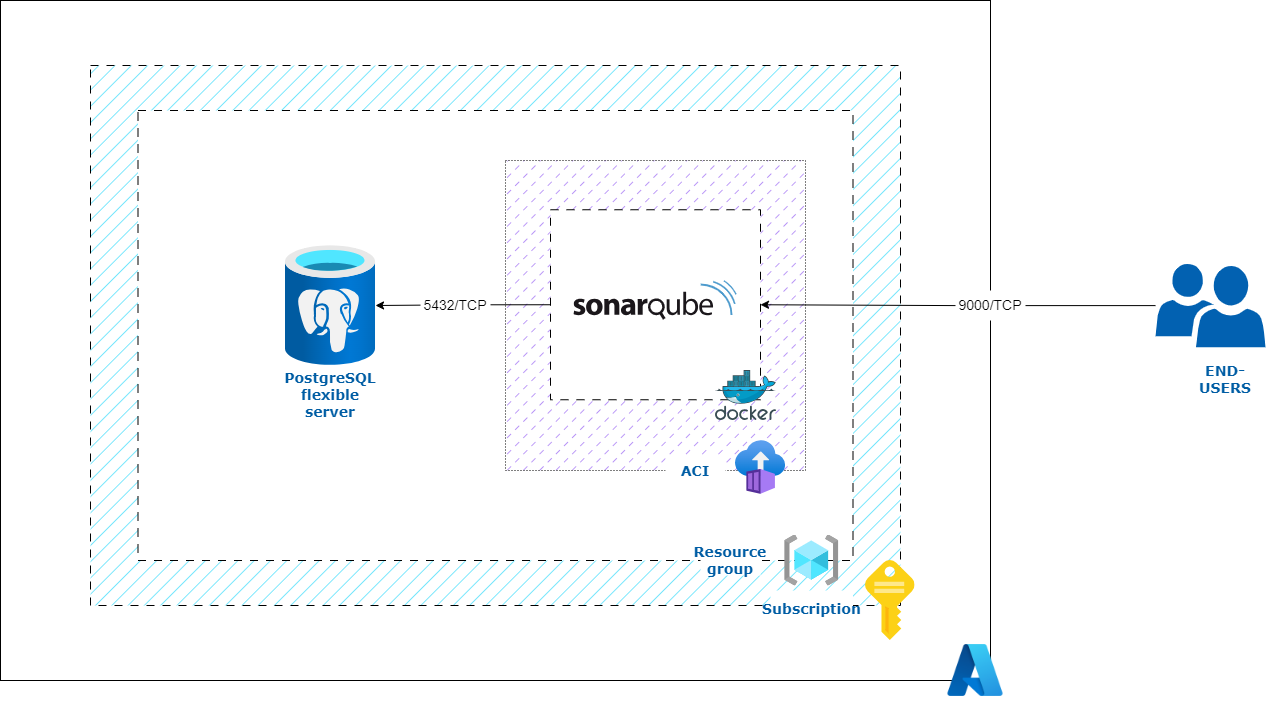
SonarQube with PostgreSQL in Azure (Part 1: manual deploy)
Pre-requests
Install Terraform
Ensure that your system is up to date and you have installed the gnupg, software-properties-common, and curl packages installed. You will use these packages to verify HashiCorp’s GPG signature and install HashiCorp’s Debian package repository.
sudo apt-get update && sudo apt-get install -y gnupg software-properties-common
Install the HashiCorp GPG key.
wget -O- https://apt.releases.hashicorp.com/gpg | \
gpg --dearmor | \
sudo tee /usr/share/keyrings/hashicorp-archive-keyring.gpg > /dev/null
Add the official HashiCorp repository to your system.
echo "deb [signed-by=/usr/share/keyrings/hashicorp-archive-keyring.gpg] \
https://apt.releases.hashicorp.com $(lsb_release -cs) main" | \
sudo tee /etc/apt/sources.list.d/hashicorp.list
Download the package information from HashiCorp and install Terraform
sudo apt update && sudo apt-get install terraform
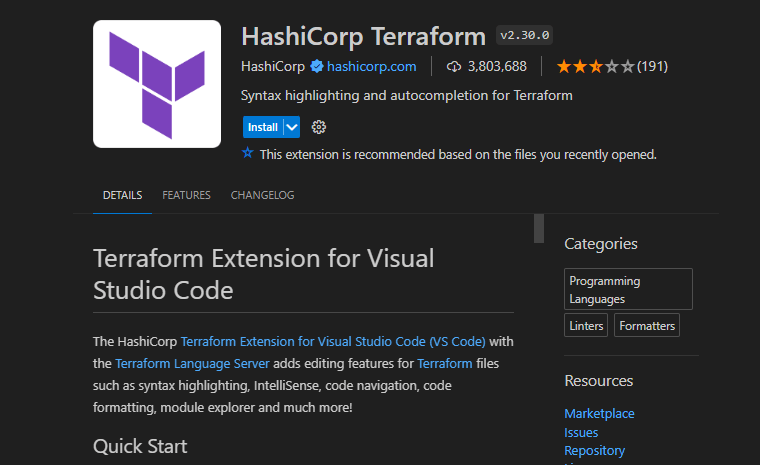
Install HashiCorp Terraform extention for VSCode
If you use VSCode, you can install Terraform extention. Press Ctrl+Shift+X for invoke extensions. Type HashiCorp Terraform in find-gape and install this extention.
Install Azure CLI
curl -sL https://aka.ms/InstallAzureCLIDeb | sudo bash
Scripts
Azure infrastructure - Terraform script
provider.tf
terraform {
  required_providers {
    azurerm = {
      source  = "hashicorp/azurerm"
      version = ">=3.77.0"
    }
  }
  backend "local" {} #"azurerm" {}
}
provider "azurerm" {
  features {}
}

data "azurerm_client_config" "current" {}
main.tf
### Create Resource Group
resource "azurerm_resource_group" "rg" {
  name     = var.rg_name
  location = var.location
}

### Create Starage account
resource "azurerm_storage_account" "sa" {
  depends_on               = [azurerm_resource_group.rg]
  name                     = var.sa_name
  resource_group_name      = azurerm_resource_group.rg.name
  location                 = var.location
  account_tier             = var.sa_tier
  account_replication_type = var.sa_repl
  min_tls_version          = "TLS1_2"
}

resource "azurerm_storage_share" "fs_sonarqubedata" {
  depends_on           = [azurerm_storage_account.sa]
  name                 = "sonarqubedata"
  storage_account_name = azurerm_storage_account.sa.name
  quota                = 2
  access_tier          = "Hot"
}
resource "azurerm_storage_share" "fs_sonarqubeextensions" {
  depends_on           = [azurerm_storage_account.sa]
  name                 = "sonarqubeextensions"
  storage_account_name = azurerm_storage_account.sa.name
  quota                = 1
  access_tier          = "Hot"
}
resource "azurerm_storage_share" "fs_sonarqubelogs" {
  depends_on           = [azurerm_storage_account.sa]
  name                 = "sonarqubelogs"
  storage_account_name = azurerm_storage_account.sa.name
  quota                = 1
  access_tier          = "Hot"
}

### Create LogAnalitycs Workspace
resource "azurerm_log_analytics_workspace" "la_ws" {
  name                = "LogAnalyticsWS"
  location            = var.location
  resource_group_name = azurerm_resource_group.rg.name
  sku                 = "PerGB2018"
}

### Create Key Vault and assign Get permission to Func MI
resource "azurerm_key_vault" "key_vault" {
  depends_on = [azurerm_storage_account.sa,
  azurerm_log_analytics_workspace.la_ws]
  name                       = var.kv_name
  location                   = var.location
  resource_group_name        = azurerm_resource_group.rg.name
  tenant_id                  = data.azurerm_client_config.current.tenant_id
  sku_name                   = var.kv_sku
  soft_delete_retention_days = 7

}

resource "azurerm_key_vault_access_policy" "kv_policy-01" {
  depends_on   = [azurerm_key_vault.key_vault]
  key_vault_id = azurerm_key_vault.key_vault.id
  tenant_id    = data.azurerm_client_config.current.tenant_id
  object_id    = data.azurerm_client_config.current.object_id

  secret_permissions = [
    "List",
    "Get",
    "Set",
    "Delete",
    "Purge"
  ]
}

### Create Secrets

resource "azurerm_key_vault_secret" "key_vaultsecret-sa-ak" {
  depends_on   = [azurerm_key_vault_access_policy.kv_policy-01]
  name         = "sa-access-key"
  value        = azurerm_storage_account.sa.primary_access_key
  key_vault_id = azurerm_key_vault.key_vault.id
}

resource "azurerm_key_vault_secret" "key_vaultsecret-la-ws" {
  depends_on   = [azurerm_key_vault_access_policy.kv_policy-01]
  name         = "la-workspace-key"
  value        = azurerm_log_analytics_workspace.la_ws.primary_shared_key
  key_vault_id = azurerm_key_vault.key_vault.id
}

### Create Flexible Postgre DB
resource "azurerm_postgresql_flexible_server" "pg_flex_serv" {
  name                = "pgserver-${var.pg_flex_serv_name}"
  resource_group_name = azurerm_resource_group.rg.name
  location            = "North Europe" #var.location
  version             = "12"
  # delegated_subnet_id    = azurerm_subnet.subnet-db.id
  # private_dns_zone_id    = azurerm_private_dns_zone.dns.id
  administrator_login    = var.pg_admin
  administrator_password = var.pg_pass
  zone                   = 1


  storage_mb   = 32768
  storage_tier = var.pg_storage_tier

  sku_name   = var.pg_sku
  depends_on = [azurerm_resource_group.rg]

}

resource "azurerm_postgresql_flexible_server_database" "default" {
  name      = "sonar"
  server_id = azurerm_postgresql_flexible_server.pg_flex_serv.id
  collation = "en_US.utf8"
  charset   = "UTF8"
}


resource "azurerm_postgresql_flexible_server_firewall_rule" "example" {
  name             = "Azure-services"
  server_id        = azurerm_postgresql_flexible_server.pg_flex_serv.id
  start_ip_address = "0.0.0.0"
  end_ip_address   = "255.255.255.255"
}
output.tf
output "resource_group_name" {
  value = azurerm_resource_group.rg.name
}
output "loganalitycs_ws_id" {
  value = azurerm_log_analytics_workspace.la_ws.workspace_id
}
output "loganalitycs_ws_resid" {
  value = azurerm_log_analytics_workspace.la_ws.id
}
output "loganalitycs_ws_key" {
  value = azurerm_log_analytics_workspace.la_ws.primary_shared_key
}
output "storage_account_name" {
  value = azurerm_storage_account.sa.name
}
output "storage_account_key" {
  value = azurerm_storage_account.sa.primary_access_key
  sensitive = true
}
output "pg_flex_serv_fqdn" {
  value = azurerm_postgresql_flexible_server.pg_flex_serv.fqdn
}
output "pg_user_name" {
  value = azurerm_postgresql_flexible_server.pg_flex_serv.administrator_login
}
output "pg_admin_pass" {
  value = azurerm_postgresql_flexible_server.pg_flex_serv.administrator_password
  sensitive = true
}
output "db_name" {
  value = azurerm_postgresql_flexible_server_database.default.name
}
variables.tf
locals {
  current_date = timestamp()
  expiry_date  = timeadd(timestamp(), "8760h")
}

variable "rg_name" {
  type = string
}
variable "location" {
  default = "westeurope"
}
variable "sa_name" {
  type = string
}
variable "sa_tier" {
  default = "Standard"
}
variable "sa_repl" {
  default = "LRS"
}
variable "kv_name" {
  type = string
}
variable "kv_sku" {
  default = "standard"
}
variable "pg_flex_serv_name" {
  type        = string
  description = "Insert server's postfix"
}
variable "pg_admin" {
  default = "pgadmin"
}
variable "pg_pass" {
  sensitive = true
  type      = string
}
variable "pg_sku" {
  default = "B_Standard_B1ms"
}
variable "pg_storage_tier" {
  default = "P4"
}
For setting customization create additionally VARS.tfvars
VARS.tfvars
rg_name           = "REPLACE to Resource Group NAME"
sa_name           = "REPLACE to Staorge Account NAME"
kv_name           = "REPLACE to Key Vault NAME"
pg_flex_serv_name = "REPLACE to PG Server NAME"
pg_pass           = "PG Password"
Login to Azure using az cli
az login
az account show
# If need, set subscription
# az account set --subscription XXXXXXXXX
Initialize Terraform
terraform init
Plan and apply terraform script
terraform plan -var-file=VARS.tfvars
terraform apply -var-file=VARS.tfvars
Azure ACI deployment - Bash script
Bash script for deploy Azure container instance
deploy.sh
#!/bin/bash

# Set Deployment name and fqdn as first and second parameters
export DEPLOY_NAME=$1
export DEPLOY_FQDN=$2

# Get variables from Terraform output
export RG_NAME=$(terraform output -raw resource_group_name)
export SA_NAME=$(terraform output -raw storage_account_name)
export SA_ACC_KEY=$(terraform output -raw storage_account_key)
export WS_ID=$(terraform output -raw loganalitycs_ws_id)
export WS_RES_ID=$(terraform output -raw loganalitycs_ws_resid)
export WS_ACC_KEY=$(terraform output -raw loganalitycs_ws_key)
export PG_SRV_FQDN=$(terraform output -raw pg_flex_serv_fqdn)
export DB_USER_NAME=$(terraform output -raw pg_user_name)
export DB_PASS=$(terraform output -raw pg_admin_pass)
export DB_NAME=$(terraform output -raw db_name)
export JDBC_URL="jdbc:postgresql://$PG_SRV_FQDN/$DB_NAME?currentSchema=public"

# echo "Deploy Name: $DEPLOY_NAME"
# echo "Deploy FQDN: $DEPLOY_FQDN"
# echo "Resource Group Name: $RG_NAME"
# echo "Storage Account Name: $SA_NAME"
# echo "Storage Account Access key: $SA_ACC_KEY"
# echo "Log Analytics Workspace ID: $WS_ID"
# echo "Log Analytics Workspace Resource ID: $WS_RES_ID"
# echo "Log Analytics Workspace Key: $WS_ACC_KEY"
# echo "PG server FQDN: $PG_SRV_FQDN"
# echo "PG server Admin Login: $DB_USER_NAME"
# echo "PG server Admin Password: $DB_PASS"
# echo "PG Database: $DB_NAME"
# echo "JDBC URL: $JDBC_URL"
Azure container instance YAML
sonarqubeACI.yaml
define: &dpl_name ${DEPLOY_NAME}
define: &fqdn ${DEPLOY_FQDN}
define: &sa_acc_key ${SA_ACC_KEY}
define: &sa_name ${SA_NAME}
define: &db_user_name ${DB_USER_NAME}
define: &db_pass ${DB_PASS}
define: &ws_id ${WS_ID}
define: &ws_res_id ${WS_RES_ID}
define: &ws_acc_key ${WS_ACC_KEY}
define: &jdbc_url ${JDBC_URL}

name: *dpl_name
apiVersion: '2021-10-01'
location: westeurope

properties:
  containers:

### SonarQube container
  - name: sonarqube
    properties:
      image: sonarqube:community
      resources:
        requests:
          cpu: 1
          memoryInGb: 3
      ports:
      - protocol: tcp
        port: 9000
      volumeMounts:
      - name: sonarqube-data
        mountPath: /opt/sonarqube/data
        readOnly: false
      - name: sonarqube-extensions
        mountPath: /opt/sonarqube/extensions
        readOnly: false
      - name: sonarqube-logs
        mountPath: /opt/sonarqube/logs
        readOnly: false
      environmentVariables:
      - name: SONAR_JDBC_URL
        value: *jdbc_url
      - name: SONAR_JDBC_USERNAME
        value: *db_user_name
      - name: SONAR_JDBC_PASSWORD
        secureValue: *db_pass
      - name: SONAR_ES_BOOTSTRAP_CHECKS_DISABLE
        value: true


  volumes:

### SonarQube Volumes
  - name: sonarqube-data
    azureFile:
      shareName: sonarqubedata
      readOnly: false
      storageAccountName: *sa_name
      storageAccountKey: *sa_acc_key
  - name: sonarqube-extensions
    azureFile:
      shareName: sonarqubeextensions
      readOnly: false
      storageAccountName: *sa_name
      storageAccountKey: *sa_acc_key
  - name: sonarqube-logs
    azureFile:
      shareName: sonarqubelogs
      readOnly: false
      storageAccountName: *sa_name
      storageAccountKey: *sa_acc_key

  osType: Linux
  sku: Standard
  ipAddress:
    type: Public
    dnsNameLabel: *fqdn
    ports:
    - protocol: tcp
      port: 9000
  diagnostics:
    logAnalytics:
      workspaceId: *ws_id
      workspaceKey: *ws_acc_key
      workspaceResourceId: *ws_res_id
      logType: ContainerInstanceLogs
For deploy execute
source ./deploy.sh REPLACE_DEPLOY_NAME REPLACE_DEPLOY_FQDN; az container create --resource-group=$RG_NAME --file sonarqubeACI.yaml
After deployment is completed, open browser and go to http://REPLACE_DEPLOY_FQDN.westeurope.azurecontainer.io:9000/